







-
 Agriculture
-
 Health-Care
-
 Environment
-
 Construction-Real-Estate
-
 Tools-Hardware
-
 Home-Garden
-
 Furniture
-
 Luggage-Bags-Cases
-
 Medical-devices-Supplies
-
 Gifts-Crafts
-
 Sports-Entertainment
-
 Food-Beverage
-
 Vehicles-Transportation
-
 Power-Transmission
-
 Material-Handling
-
 Renewable-Energy
-
 Safety
-
 Testing-Instrument-Equipment
-
 Construction-Building-Machinery
-
 Pet-Supplies
-
 Personal-Care-Household-Cleaning
-
 Vehicle-Accessories-Electronics-Tools
-
 School-Office-Supplies
-
 Packaging-Printing
-
 Mother-Kids-Toys
-
 Business-Services
-
 Commercial-Equipment-Machinery
-
 Apparel-Accessories
-
 Security
-
 Shoes-Accessories
-
 Vehicle-Parts-Accessories
-
 Jewelry-Eyewear-Watches-Accessories
-
 Lights-Lighting
-
 Fabric-Textile-Raw-Material
-
 Fabrication-Services
-
 Industrial-Machinery
-
 Consumer-Electronics
-
 Electrical-Equipment-Supplies
-
 Electronic-Components-Accessories-Telecommunications
-
 Home-Appliances
-
 Beauty
-
 Chemicals
-
 Rubber-Plastics
-
 Metals-Alloys






































































































































































































































































- Masonry Materials
- Curtain Walls & Accessories
- Earthwork Products
- Fireproofing Materials
- Heat Insulation Materials
- Plastic Building Materials
- Building Boards
- Soundproofing Materials
- Timber
- Waterproofing Materials
- Balustrades & Handrails
- Bathroom & Kitchen
- Flooring & Accessories
- Tiles & Accessories
- Door, Window & Accessories
- Fireplaces & Stoves
- Floor Heating Systems & Parts
- Stairs & Stair Parts
- Ceilings
- Elevators & Escalators
- Stone
- Countertops, Vanity Tops & Table Tops
- Mosaics
- Metal Building Materials
- Multifunctional Materials
- Ladders & Scaffoldings
- Mouldings
- Corner Guards
- Decorative Films
- Formwork
- Building & Industrial Glass
- Other Construction & Real Estate
- Wallpapers/Wall panels
- HVAC System & Parts
- Outdoor Facilities
- Prefabricated Buildings
- Festive & Party Supplies
- Bathroom Products
- Household Sundries
- Rain Gear
- Garden Supplies
- Household Cleaning Tools & Accessories
- Lighters & Smoking Accessories
- Home Storage & Organization
- Household Scales
- Smart Home Improvement
- Home Textiles
- Kitchenware
- Drinkware & Accessories
- Dinnerware, Coffee & Wine
- Home Decor
- Golf
- Fitness & Body Building
- Amusement Park Facilities
- Billiards, Board Game,Coin Operated Games
- Musical Instruments
- Outdoor Affordable Luxury Sports
- Camping & Hiking
- Fishing
- Sports Safety&Rehabilitation
- Ball Sports Equipments
- Water Sports
- Winter Sports
- Luxury Travel Equipments
- Sports Shoes, Bags & Accessories
- Cycling
- Other Sports & Entertainment Products
- Artificial Grass&Sports Flooring&Sports Court Equipment
- Scooters
- Food Ingredients
- Honey & Honey Products
- Snacks
- Nuts & Kernels
- Seafood
- Plant & Animal Oil
- Beverages
- Fruit & Vegetable Products
- Frog & Escargot
- Bean Products
- Egg Products
- Dairy Products
- Seasonings & Condiments
- Canned Food
- Instant Food
- Baked Goods
- Other Food & Beverage
- Meat & Poultry
- Confectionery
- Grain Products
- Feminie Care
- Hair Care & Styling
- Body Care
- Hands & Feet Care
- Hygiene Products
- Men's Grooming
- Laundry Cleaning Supplies
- Travel Size & Gift Sets
- Room Deodorizers
- Other Personal Care Products
- Pest Control Products
- Special Household Cleaning
- Floor Cleaning
- Kitchen & Bathroom Cleaning
- Oral Care
- Bath Supplies
- Yellow Pages
- Correction Supplies
- Office Binding Supplies
- Office Cutting Supplies
- Board Erasers
- Office Adhesives & Tapes
- Education Supplies
- Pencil Cases & Bags
- Notebooks & Writing Pads
- File Folder Accessories
- Calendars
- Writing Accessories
- Commercial Office Supplies
- Pencil Sharpeners
- Pens
- Letter Pad/Paper
- Paper Envelopes
- Desk Organizers
- Pencils
- Markers & Highlighters
- Filing Products
- Art Supplies
- Easels
- Badge Holder & Accessories
- Office Paper
- Printer Supplies
- Book Covers
- Other Office & School Supplies
- Stationery Set
- Boards
- Clipboards
- Stamps
- Drafting Supplies
- Stencils
- Electronic Dictionary
- Books
- Map
- Magazines
- Calculators
- Baby & Toddler Toys
- Educational Toys
- Classic Toys
- Dress Up & Pretend Play
- Toy Vehicle
- Stuffed Animals & Plush Toys
- Outdoor Toys & Structures
- Balloons & Accessories
- Baby Food
- Children's Clothing
- Baby Supplies & Products
- Maternity Clothes
- Kids Shoes
- Baby Care
- Novelty & Gag Toys
- Dolls & Accessories
- Puzzle & Games
- Blocks & Model Building Toys
- Toddler Clothing
- Baby Clothing
- Kids' Luggage & Bags
- Arts, Crafts & DIY Toys
- Action & Toy Figures
- Baby Appliances
- Hobbies & Models
- Remote Control Toys
- Promotional Toys
- Pregnancy & Maternity
- Hygiene Products
- Kid's Textile&Bedding
- Novelty & Special Use
- Toy Weapons
- Baby Gifts
- Baby Storage & Organization
- Auto Drive Systems
- ATV/UTV Parts & Accessories
- Marine Parts & Accessories
- Other Auto Parts
- Trailer Parts & Accessories
- Auto Transmission Systems
- Train Parts & Accessories
- Universal Parts
- Railway Parts & Accessories
- Auto Brake Systems
- Aviation Parts & Accessories
- Truck Parts & Accessories
- Auto Suspension Systems
- Auto Lighting Systems
- New Energy Vehicle Parts & Accessories
- Auto Steering Systems
- Wheels, Tires & Accessories
- Bus Parts & Accessories
- Auto Performance Parts
- Cooling System
- Go-Kart & Kart Racer Parts & Accessories
- Air Conditioning Systems
- Heavy Duty Vehicle Parts & Accessories
- Auto Electrical Systems
- Auto Body Systems
- Auto Engine Systems
- Container Parts & Accessories
- Motorcycle Parts & Accessories
- Refrigeration & Heat Exchange Equipment
- Machine Tool Equipment
- Food & Beverage Machinery
- Agricultural Machinery & Equipment
- Apparel & Textile Machinery
- Chemical Machinery
- Packaging Machines
- Paper Production Machinery
- Plastic & Rubber Processing Machinery
- Industrial Robots
- Electronic Products Machinery
- Metal & Metallurgy Machinery
- Woodworking Machinery
- Home Product Manufacturing Machinery
- Machinery Accessories
- Environmental Machinery
- Machinery Service
- Electrical Equipment Manufacturing Machinery
- Industrial Compressors & Parts
- Tobacco & Cigarette Machinery
- Production Line
- Used Industrial Machinery
- Electronics Production Machinery
- Other Machinery & Industrial Equipment
- Camera, Photo & Accessories
- Portable Audio, Video & Accessories
- Television, Home Audio, Video & Accessories
- Video Games & Accessories
- Mobile Phone & Accessories
- Electronic Publications
- Earphone & Headphone & Accessories
- Speakers & Accessories
- Smart Electronics
- TV Receivers & Accessories
- Mobile Phone & Computer Repair Parts
- Chargers, Batteries & Power Supplies
- Used Electronics
- VR, AR, MR Hardware & Software
- Projectors & Presentation Equipments
- Other Consumer Electronics
- Cables & Commonly Used Accessories
- Computer Hardware & Software
- Displays, Signage and Optoelectronics
- Discrete Semiconductors
- Wireless & IoT Module and Products
- Telecommunications
- Connectors, Terminals & Accessories
- Development Boards, Electronic Modules and Kits
- Circuit Protection
- Sensors
- Isolators
- Audio Components and Products
- Integrated Circuits
- Power Supplies
- Relays
- RF, Microwave and RFID
- Electronic Accessories & Supplies
- Passive Components
- PCB & PCBA
- Air Quality Appliances
- Home Appliance Parts
- Heating & Cooling Appliances
- Small Kitchen Appliances
- Laundry Appliances
- Water Heaters
- Water Treatment Appliances
- Refrigerators & Freezers
- Personal Care & Beauty Appliances
- Major Kitchen Appliances
- Cleaning Appliances
- Second-hand Appliances
- Smart Home Appliances
- Other Home Appliances
- Energy Chemicals
- Inorganic Chemicals
- Basic Organic Chemicals
- Agrochemicals
- Admixture & Additives
- Catalysts & Chemical Auxiliary Agents
- Pigments & Dyestuff
- Coating & Paint
- Daily Chemicals
- Polymer
- Organic Intermediate
- Adhesives & Sealants
- Chemical Waste
- Biological Chemical Products
- Surface Treatment Chemicals
- Painting & Coating
- Chemical Reagents
- Flavor & Fragrance
- Non-Explosive Demolition Agents
- Other Chemicals
- Custom Chemical Services

How Remote Training Helps Prevent LCD Separator Damage by New Operators
Remote instruction can help lower the risk of LCD Separator damage during a new operator’s first repair tasks. Its effectiveness depends on teaching heat selection, tool direction, pressure, contact time, surface protection, and shutdown procedures before the operator works alone. BAKU’s BA-937C 2s Rapid Temp Soldering Station offers a 200°C–500°C iron temperature range, 120W power, and a digital display, making it a useful reference unit for structured electronics repair training.
Training Strategy and Main Benefits
- Use live or recorded remote demonstrations to explain LCD Separator preparation, workpiece protection, tool positioning, heat management, and component placement.
- Divide the repair process into observable checkpoints so the trainer can verify temperature settings, movement speed, pressure, contact time, and the condition of the workpiece.
- Use the BA-937C digital microcomputer display, 120W output, and 200°C–500°C temperature range to create a consistent equipment-based learning process.
- Apply the method in mobile phone and tablet repair shops, electronic laboratories, vocational classes, and practical skills programs.
Why Remote Supervision Can Reduce Damage
New operators may damage screens or components when they use excessive heat, press too hard, move the tool unevenly, or leave the tool in contact with one area for too long. Remote training reduces these variations by giving trainees a fixed sequence to follow. The instructor can demonstrate preparation, temperature selection, controlled movement, separation or soldering technique, inspection, and equipment shutdown in the correct order.
For LCD Separator-related operations, the instructor should focus on stable temperature control, limited contact time, moderate pressure, and careful workpiece support. A camera or live video connection allows the trainer to identify incorrect hand movements and unsafe positioning while the trainee is still practicing. Correcting these actions early can help prevent them from becoming repeated habits.
Equipment Reference for Practical Instruction
BAKU specifies the BA-937C as a 120W soldering station with a digital microcomputer display and a 200°C–500°C iron temperature range. The unit measures 225x194x105mm, weighs 1kg net, and has a stated noise level below 45dB. These published specifications provide a repeatable equipment reference for remote instruction, although the product information does not identify the BA-937C as an LCD Separator.
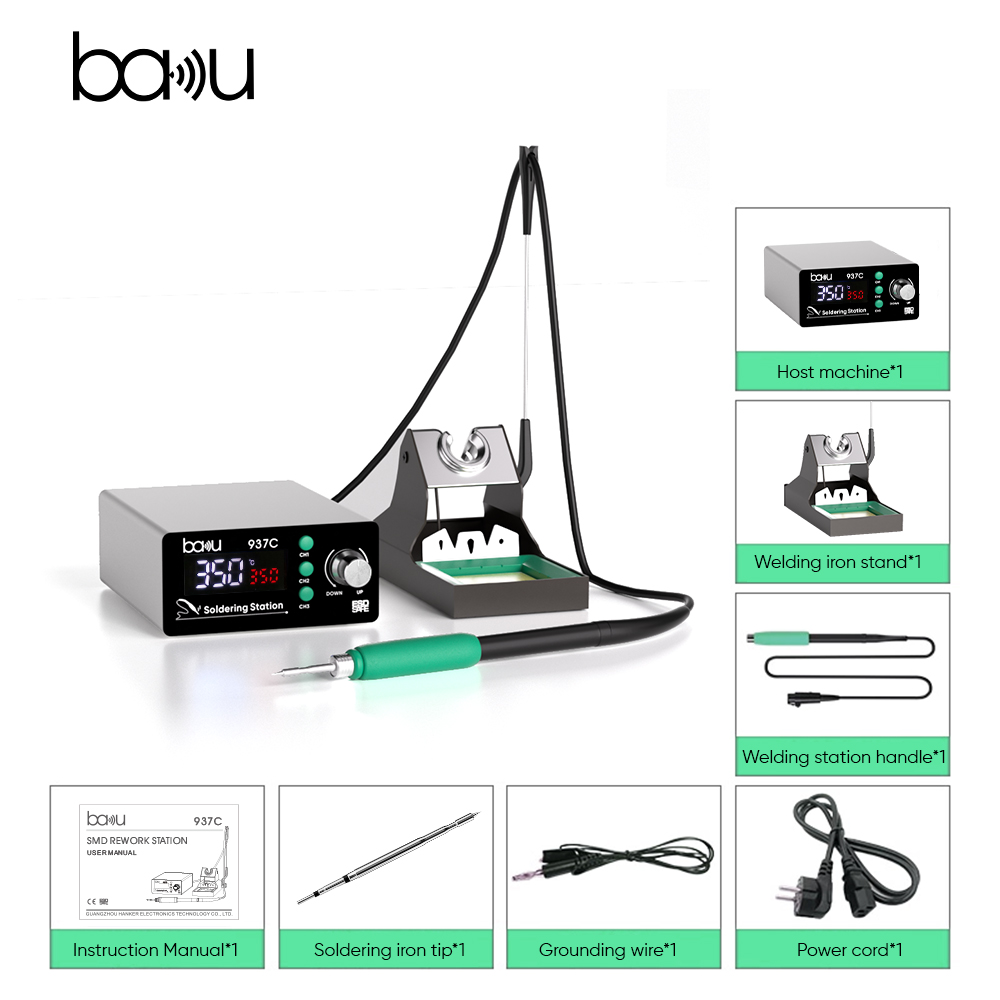
BAKU lists mobile phone and tablet motherboard repair, screen separation, welding cleaning, and component replacement among its application scenarios. Electronic training, laboratory teaching, and practical soldering are also identified as suitable environments. These applications can support a remote learning program in which trainees practice under direct observation before progressing to independent work.
Recommended Remote Training Workflow
A practical program can begin with a trainer demonstration, followed by a trainee repeat of each step. Before operation, the trainee should confirm the selected temperature, tool condition, workpiece position, and protective materials. During the task, the trainer can check tool angle, movement, pressure, and contact duration. Afterward, both parties should inspect the workpiece and record any visible damage or process deviation.
BAKU states that its solder stations have CE certificates for the European Union and FCC certificates for the United States. These certifications provide product compliance references for the listed solder station products, but they do not replace operator training, risk assessment, or task-specific safety instructions.
Reported cooperation examples include a mobile phone repair shop in the Philippines, a vocational training institution in Malaysia, a computer repair workshop in Mexico, and a local tool wholesaler in Saudi Arabia. The cases describe applications involving motherboard repair, student instruction, laptop circuit-board work, and repair-tool distribution.
Comparison of Training Methods
| Operating or training method | Likely effect on damage risk | Supporting consideration |
|---|---|---|
| First operation without supervision | Higher risk because incorrect heat, pressure, or movement may go unnoticed | No staged review or immediate correction is available |
| Remote demonstration with observed practice | Lower risk because handling errors can be corrected during practice | Can be used in repair shops, laboratories, and training institutions |
| Remote instruction with equipment checks | Lower process variation when operators confirm settings before starting | BA-937C provides a digital display, 120W power, and a 200°C–500°C range |
| Independent operation after competency review | Creates a more controlled transition to routine work | Requires task-specific verification; no standard competency metric is provided |
Frequently Asked Questions
Can remote training eliminate all LCD Separator damage?
No. Remote training can address mistakes caused by inexperienced handling, but it cannot guarantee complete prevention. Equipment condition, screen condition, workpiece preparation, and execution still need to be checked.
Which operator actions should the trainer observe?
The trainer should review temperature selection, tool placement, movement direction and speed, contact time, applied pressure, surface protection, component positioning, and the final workpiece inspection.
Is the BA-937C suitable for remote repair training?
Yes. It can be used as the equipment reference for soldering and electronics repair instruction. Its documented features include a digital microcomputer display, 120W power, and a 200°C–500°C iron temperature range. The available product information does not state that it is an LCD Separator.
Conclusion and Purchasing Support
Remote training can reduce LCD Separator damage caused by new operators when it combines clear demonstrations, supervised repetition, equipment parameter checks, and post-task inspection. BAKU provides its own brand for stock-based wholesale supply and also supports OEM and ODM customization. The listed minimum order quantity is 50pcs, with a stated delivery period of 7–15 days and one year of after-sales support with online service. For technical solutions or product assistance, please contact hanker002@bakutool.com.
About BAKU
Guangdong BAKU Technology Development Co., Ltd. was established in 2003 and develops professional electronic repair equipment in more than thirty categories, including soldering stations, solder flux, solder paste, screwdrivers, and ultrasonic cleaners. Its independent R&D laboratory supports industrial design, structural development, PCB debugging, and reliability testing. The company states that it owns 25 design patents and has supplied products to repair stores, vocational schools, computer workshops, and tool wholesalers. CE, FCC, and RoHS certification records are listed for relevant products.

REPORT