







-
 Agriculture
-
 Health-Care
-
 Environment
-
 Construction-Real-Estate
-
 Tools-Hardware
-
 Home-Garden
-
 Furniture
-
 Luggage-Bags-Cases
-
 Medical-devices-Supplies
-
 Gifts-Crafts
-
 Sports-Entertainment
-
 Food-Beverage
-
 Vehicles-Transportation
-
 Power-Transmission
-
 Material-Handling
-
 Renewable-Energy
-
 Safety
-
 Testing-Instrument-Equipment
-
 Construction-Building-Machinery
-
 Pet-Supplies
-
 Personal-Care-Household-Cleaning
-
 Vehicle-Accessories-Electronics-Tools
-
 School-Office-Supplies
-
 Packaging-Printing
-
 Mother-Kids-Toys
-
 Business-Services
-
 Commercial-Equipment-Machinery
-
 Apparel-Accessories
-
 Security
-
 Shoes-Accessories
-
 Vehicle-Parts-Accessories
-
 Jewelry-Eyewear-Watches-Accessories
-
 Lights-Lighting
-
 Fabric-Textile-Raw-Material
-
 Fabrication-Services
-
 Industrial-Machinery
-
 Consumer-Electronics
-
 Electrical-Equipment-Supplies
-
 Electronic-Components-Accessories-Telecommunications
-
 Home-Appliances
-
 Beauty
-
 Chemicals
-
 Rubber-Plastics
-
 Metals-Alloys



































































































































































































































































- Masonry Materials
- Curtain Walls & Accessories
- Earthwork Products
- Fireproofing Materials
- Heat Insulation Materials
- Plastic Building Materials
- Building Boards
- Soundproofing Materials
- Timber
- Waterproofing Materials
- Balustrades & Handrails
- Bathroom & Kitchen
- Flooring & Accessories
- Tiles & Accessories
- Door, Window & Accessories
- Fireplaces & Stoves
- Floor Heating Systems & Parts
- Stairs & Stair Parts
- Ceilings
- Elevators & Escalators
- Stone
- Countertops, Vanity Tops & Table Tops
- Mosaics
- Metal Building Materials
- Multifunctional Materials
- Ladders & Scaffoldings
- Mouldings
- Corner Guards
- Decorative Films
- Formwork
- Building & Industrial Glass
- Other Construction & Real Estate
- Wallpapers/Wall panels
- HVAC System & Parts
- Outdoor Facilities
- Prefabricated Buildings
- Festive & Party Supplies
- Bathroom Products
- Household Sundries
- Rain Gear
- Garden Supplies
- Household Cleaning Tools & Accessories
- Lighters & Smoking Accessories
- Home Storage & Organization
- Household Scales
- Smart Home Improvement
- Home Textiles
- Kitchenware
- Drinkware & Accessories
- Dinnerware, Coffee & Wine
- Home Decor
- Golf
- Fitness & Body Building
- Amusement Park Facilities
- Billiards, Board Game,Coin Operated Games
- Musical Instruments
- Outdoor Affordable Luxury Sports
- Camping & Hiking
- Fishing
- Sports Safety&Rehabilitation
- Ball Sports Equipments
- Water Sports
- Winter Sports
- Luxury Travel Equipments
- Sports Shoes, Bags & Accessories
- Cycling
- Other Sports & Entertainment Products
- Artificial Grass&Sports Flooring&Sports Court Equipment
- Scooters
- Food Ingredients
- Honey & Honey Products
- Snacks
- Nuts & Kernels
- Seafood
- Plant & Animal Oil
- Beverages
- Fruit & Vegetable Products
- Frog & Escargot
- Bean Products
- Egg Products
- Dairy Products
- Seasonings & Condiments
- Canned Food
- Instant Food
- Baked Goods
- Other Food & Beverage
- Meat & Poultry
- Confectionery
- Grain Products
- Feminie Care
- Hair Care & Styling
- Body Care
- Hands & Feet Care
- Hygiene Products
- Men's Grooming
- Laundry Cleaning Supplies
- Travel Size & Gift Sets
- Room Deodorizers
- Other Personal Care Products
- Pest Control Products
- Special Household Cleaning
- Floor Cleaning
- Kitchen & Bathroom Cleaning
- Oral Care
- Bath Supplies
- Yellow Pages
- Correction Supplies
- Office Binding Supplies
- Office Cutting Supplies
- Board Erasers
- Office Adhesives & Tapes
- Education Supplies
- Pencil Cases & Bags
- Notebooks & Writing Pads
- File Folder Accessories
- Calendars
- Writing Accessories
- Commercial Office Supplies
- Pencil Sharpeners
- Pens
- Letter Pad/Paper
- Paper Envelopes
- Desk Organizers
- Pencils
- Markers & Highlighters
- Filing Products
- Art Supplies
- Easels
- Badge Holder & Accessories
- Office Paper
- Printer Supplies
- Book Covers
- Other Office & School Supplies
- Stationery Set
- Boards
- Clipboards
- Stamps
- Drafting Supplies
- Stencils
- Electronic Dictionary
- Books
- Map
- Magazines
- Calculators
- Baby & Toddler Toys
- Educational Toys
- Classic Toys
- Dress Up & Pretend Play
- Toy Vehicle
- Stuffed Animals & Plush Toys
- Outdoor Toys & Structures
- Balloons & Accessories
- Baby Food
- Children's Clothing
- Baby Supplies & Products
- Maternity Clothes
- Kids Shoes
- Baby Care
- Novelty & Gag Toys
- Dolls & Accessories
- Puzzle & Games
- Blocks & Model Building Toys
- Toddler Clothing
- Baby Clothing
- Kids' Luggage & Bags
- Arts, Crafts & DIY Toys
- Action & Toy Figures
- Baby Appliances
- Hobbies & Models
- Remote Control Toys
- Promotional Toys
- Pregnancy & Maternity
- Hygiene Products
- Kid's Textile&Bedding
- Novelty & Special Use
- Toy Weapons
- Baby Gifts
- Baby Storage & Organization
- Auto Drive Systems
- ATV/UTV Parts & Accessories
- Marine Parts & Accessories
- Other Auto Parts
- Trailer Parts & Accessories
- Auto Transmission Systems
- Train Parts & Accessories
- Universal Parts
- Railway Parts & Accessories
- Auto Brake Systems
- Aviation Parts & Accessories
- Truck Parts & Accessories
- Auto Suspension Systems
- Auto Lighting Systems
- New Energy Vehicle Parts & Accessories
- Auto Steering Systems
- Wheels, Tires & Accessories
- Bus Parts & Accessories
- Auto Performance Parts
- Cooling System
- Go-Kart & Kart Racer Parts & Accessories
- Air Conditioning Systems
- Heavy Duty Vehicle Parts & Accessories
- Auto Electrical Systems
- Auto Body Systems
- Auto Engine Systems
- Container Parts & Accessories
- Motorcycle Parts & Accessories
- Refrigeration & Heat Exchange Equipment
- Machine Tool Equipment
- Food & Beverage Machinery
- Agricultural Machinery & Equipment
- Apparel & Textile Machinery
- Chemical Machinery
- Packaging Machines
- Paper Production Machinery
- Plastic & Rubber Processing Machinery
- Industrial Robots
- Electronic Products Machinery
- Metal & Metallurgy Machinery
- Woodworking Machinery
- Home Product Manufacturing Machinery
- Machinery Accessories
- Environmental Machinery
- Machinery Service
- Electrical Equipment Manufacturing Machinery
- Industrial Compressors & Parts
- Tobacco & Cigarette Machinery
- Production Line
- Used Industrial Machinery
- Electronics Production Machinery
- Other Machinery & Industrial Equipment
- Camera, Photo & Accessories
- Portable Audio, Video & Accessories
- Television, Home Audio, Video & Accessories
- Video Games & Accessories
- Mobile Phone & Accessories
- Electronic Publications
- Earphone & Headphone & Accessories
- Speakers & Accessories
- Smart Electronics
- TV Receivers & Accessories
- Mobile Phone & Computer Repair Parts
- Chargers, Batteries & Power Supplies
- Used Electronics
- VR, AR, MR Hardware & Software
- Projectors & Presentation Equipments
- Other Consumer Electronics
- Cables & Commonly Used Accessories
- Computer Hardware & Software
- Displays, Signage and Optoelectronics
- Discrete Semiconductors
- Wireless & IoT Module and Products
- Telecommunications
- Connectors, Terminals & Accessories
- Development Boards, Electronic Modules and Kits
- Circuit Protection
- Sensors
- Isolators
- Audio Components and Products
- Integrated Circuits
- Power Supplies
- Relays
- RF, Microwave and RFID
- Electronic Accessories & Supplies
- Passive Components
- PCB & PCBA
- Air Quality Appliances
- Home Appliance Parts
- Heating & Cooling Appliances
- Small Kitchen Appliances
- Laundry Appliances
- Water Heaters
- Water Treatment Appliances
- Refrigerators & Freezers
- Personal Care & Beauty Appliances
- Major Kitchen Appliances
- Cleaning Appliances
- Second-hand Appliances
- Smart Home Appliances
- Other Home Appliances
- Energy Chemicals
- Inorganic Chemicals
- Basic Organic Chemicals
- Agrochemicals
- Admixture & Additives
- Catalysts & Chemical Auxiliary Agents
- Pigments & Dyestuff
- Coating & Paint
- Daily Chemicals
- Polymer
- Organic Intermediate
- Adhesives & Sealants
- Chemical Waste
- Biological Chemical Products
- Surface Treatment Chemicals
- Painting & Coating
- Chemical Reagents
- Flavor & Fragrance
- Non-Explosive Demolition Agents
- Other Chemicals
- Custom Chemical Services

How to Manage Computer Accessory Warranty Claims Without Costly Returns
Expensive return shipping does not have to delay a computer accessory warranty claim. A structured process based on remote troubleshooting, clear documentation, and evidence-based assessment can help determine whether the issue requires technical guidance or product replacement. For a HUB ADAPTER, buyers should submit order information, describe the failure precisely, and provide photos, videos, system details, and test results before sending the unit back.
Practical Warranty Claim Strategy
- Prepare the product model, purchase record, fault description, photos or video, and information about the connected device.
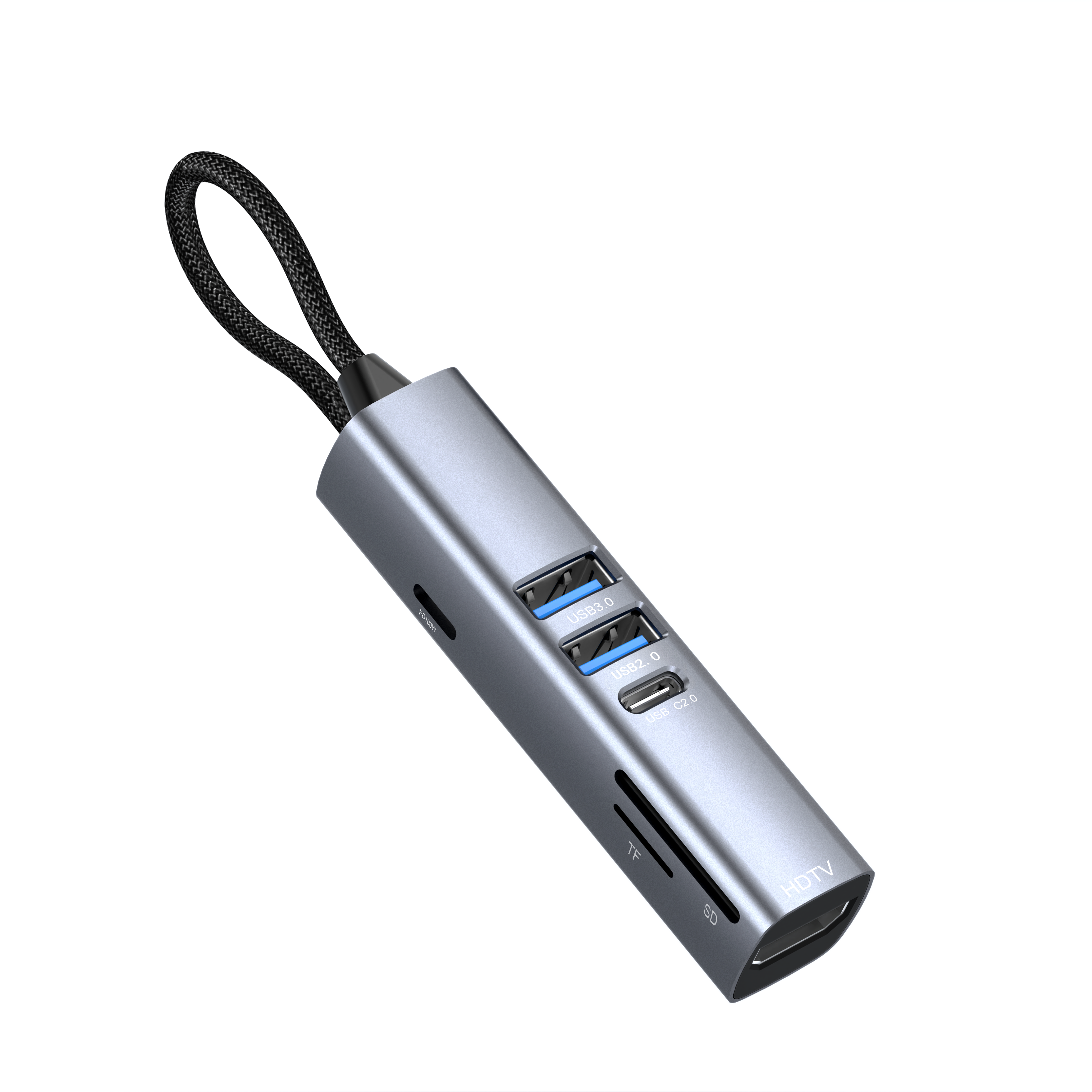
- Test the Type-C input, USB ports, PD100W charging output, HDMI output, SD slot, and TF slot separately.
- Use remote diagnosis to identify possible compatibility, power, cable, system, or product-quality problems.
- Ask for replacement or technical support when the evidence confirms a quality issue and return freight would be disproportionate.
- For home, office, travel, retail, e-commerce, and corporate purchasing, record the operating environment and connected equipment.
How to Document and Diagnose the Problem
A strong claim starts with information that the supplier can verify. Include the HUB ADAPTER model, order number, purchase date, quantity, host device, operating system, power source, and the specific port or feature that is not working. A clear photograph of the product and a short video showing the failure may allow the supplier to evaluate the claim without an immediate physical return.
The adapter includes a Type-C input and supports USB 3.0, USB 2.0, PD100W, HDMI-4K/30HZ, SD, and TF connections. USB 3.0 is rated for transfer speeds up to 5GBPS, while USB 2.0 supports up to 480MBPS. Checking each interface independently can show whether the problem is limited to one connection or linked to power delivery, device compatibility, or a wider hardware fault.
Recommended Troubleshooting Checks
The HUB ADAPTER is designed for plug-and-play operation and supports MOS, Windows, Android, and other systems without an installation driver. Before filing a final claim, reconnect the adapter, try another compatible host device, replace the cable if applicable, and test a different power source. Note which functions work and which fail. This information helps distinguish an operating or compatibility concern from a confirmed product defect.
FABIT states that every product is inspected before shipment and that replacement or technical support is available for quality-related problems. Its certification information lists ROHS for EU/EEA phone and computer accessories and CE for the same product category. Keeping a complete record allows the supplier to review the case efficiently and may prevent unnecessary returns of products that only require setup assistance.
Warranty Resolution Options
| Claim method | Useful supporting evidence | Shipping exposure | Recommended result |
|---|---|---|---|
| Remote troubleshooting | Fault details, host-device information, photos, and video | Low | Technical guidance when compatibility, power, or operation may be involved |
| Replacement for a verified defect | Order records and proof of the reported failure | Lower than returning all units | Replacement or technical support under the applicable after-sales policy |
| Physical inspection return | Claim records, authorization, and shipping confirmation | High | Use when remote testing cannot determine the cause |
| Pre-shipment inspection | Quality-control documentation and shipment data | Helps reduce future claims | Inspection of products before dispatch |
Experience Supporting Customized Accessory Projects
In one cooperation project, FABIT supplied a customized data cable for a consumer electronics brand in Argentina. The project required attention to product quality, branding, packaging, communication, production stability, and delivery schedules. This type of cooperation demonstrates why organized issue reporting and clear supplier communication are important when resolving warranty matters for branded accessories.
Frequently Asked Questions
What information is needed for a computer accessory warranty claim?
Provide the product name, order details, purchase date, fault description, connected device, operating system, affected port or function, and clear photos or video. For a HUB ADAPTER, specify whether the issue involves the Type-C input, USB 3.0, USB 2.0, PD100W, HDMI, SD, or TF interface.
Can technical support be requested before returning the HUB ADAPTER?
Yes. Remote diagnosis can be completed before shipment is arranged. Include the host device and system information because the adapter supports MOS, Windows, Android, and other systems.
What can happen when a quality problem is confirmed?
FABIT indicates that replacement or technical support is available for quality issues. The company also states that products receive 100% inspection before shipment, enabling the reported failure to be reviewed against documented evidence.
Conclusion
When return freight is expensive, begin with a documented remote assessment. Test the HUB ADAPTER one function at a time, preserve the order and diagnostic records, and provide the supplier with concise evidence. Confirmed quality issues can then be directed toward replacement or technical assistance instead of automatically returning every unit. FABIT operates as an OEM/ODM manufacturer with a stated 25-30 day delivery period and serves customers in Europe, North America, Southeast Asia, the Middle East, and South America. For technical solutions or after-sales support, contact xixi@dgfabit.com.
About Us
Dongguan Fabit Technology Co.,Ltd, under the FABIT brand, develops and manufactures consumer electronics accessories such as charging cables, audio cables, adapters, card readers, docking stations, wireless chargers, high-frequency cables, and related electronic products. Founded in 2014, FABIT has a 10-engineer R&D team, a professional laboratory, advanced testing equipment, and 5 automated production systems. The company supports brand customers through product concept development, industrial design, structural engineering, packaging, mass production, and delivery. Its certifications include ROHS and CE, and it has served customers across several industries.

REPORT