







-
 Agriculture
-
 Health-Care
-
 Environment
-
 Construction-Real-Estate
-
 Tools-Hardware
-
 Home-Garden
-
 Furniture
-
 Luggage-Bags-Cases
-
 Medical-devices-Supplies
-
 Gifts-Crafts
-
 Sports-Entertainment
-
 Food-Beverage
-
 Vehicles-Transportation
-
 Power-Transmission
-
 Material-Handling
-
 Renewable-Energy
-
 Safety
-
 Testing-Instrument-Equipment
-
 Construction-Building-Machinery
-
 Pet-Supplies
-
 Personal-Care-Household-Cleaning
-
 Vehicle-Accessories-Electronics-Tools
-
 School-Office-Supplies
-
 Packaging-Printing
-
 Mother-Kids-Toys
-
 Business-Services
-
 Commercial-Equipment-Machinery
-
 Apparel-Accessories
-
 Security
-
 Shoes-Accessories
-
 Vehicle-Parts-Accessories
-
 Jewelry-Eyewear-Watches-Accessories
-
 Lights-Lighting
-
 Fabric-Textile-Raw-Material
-
 Fabrication-Services
-
 Industrial-Machinery
-
 Consumer-Electronics
-
 Electrical-Equipment-Supplies
-
 Electronic-Components-Accessories-Telecommunications
-
 Home-Appliances
-
 Beauty
-
 Chemicals
-
 Rubber-Plastics
-
 Metals-Alloys


































































































































































































































































































































- Masonry Materials
- Curtain Walls & Accessories
- Earthwork Products
- Fireproofing Materials
- Heat Insulation Materials
- Plastic Building Materials
- Building Boards
- Soundproofing Materials
- Timber
- Waterproofing Materials
- Balustrades & Handrails
- Bathroom & Kitchen
- Flooring & Accessories
- Tiles & Accessories
- Door, Window & Accessories
- Fireplaces & Stoves
- Floor Heating Systems & Parts
- Stairs & Stair Parts
- Ceilings
- Elevators & Escalators
- Stone
- Countertops, Vanity Tops & Table Tops
- Mosaics
- Metal Building Materials
- Multifunctional Materials
- Ladders & Scaffoldings
- Mouldings
- Corner Guards
- Decorative Films
- Formwork
- Building & Industrial Glass
- Other Construction & Real Estate
- Wallpapers/Wall panels
- HVAC System & Parts
- Outdoor Facilities
- Prefabricated Buildings
- Festive & Party Supplies
- Bathroom Products
- Household Sundries
- Rain Gear
- Garden Supplies
- Household Cleaning Tools & Accessories
- Lighters & Smoking Accessories
- Home Storage & Organization
- Household Scales
- Smart Home Improvement
- Home Textiles
- Kitchenware
- Drinkware & Accessories
- Dinnerware, Coffee & Wine
- Home Decor
- Golf
- Fitness & Body Building
- Amusement Park Facilities
- Billiards, Board Game,Coin Operated Games
- Musical Instruments
- Outdoor Affordable Luxury Sports
- Camping & Hiking
- Fishing
- Sports Safety&Rehabilitation
- Ball Sports Equipments
- Water Sports
- Winter Sports
- Luxury Travel Equipments
- Sports Shoes, Bags & Accessories
- Cycling
- Other Sports & Entertainment Products
- Artificial Grass&Sports Flooring&Sports Court Equipment
- Scooters
- Food Ingredients
- Honey & Honey Products
- Snacks
- Nuts & Kernels
- Seafood
- Plant & Animal Oil
- Beverages
- Fruit & Vegetable Products
- Frog & Escargot
- Bean Products
- Egg Products
- Dairy Products
- Seasonings & Condiments
- Canned Food
- Instant Food
- Baked Goods
- Other Food & Beverage
- Meat & Poultry
- Confectionery
- Grain Products
- Feminie Care
- Hair Care & Styling
- Body Care
- Hands & Feet Care
- Hygiene Products
- Men's Grooming
- Laundry Cleaning Supplies
- Travel Size & Gift Sets
- Room Deodorizers
- Other Personal Care Products
- Pest Control Products
- Special Household Cleaning
- Floor Cleaning
- Kitchen & Bathroom Cleaning
- Oral Care
- Bath Supplies
- Yellow Pages
- Correction Supplies
- Office Binding Supplies
- Office Cutting Supplies
- Board Erasers
- Office Adhesives & Tapes
- Education Supplies
- Pencil Cases & Bags
- Notebooks & Writing Pads
- File Folder Accessories
- Calendars
- Writing Accessories
- Commercial Office Supplies
- Pencil Sharpeners
- Pens
- Letter Pad/Paper
- Paper Envelopes
- Desk Organizers
- Pencils
- Markers & Highlighters
- Filing Products
- Art Supplies
- Easels
- Badge Holder & Accessories
- Office Paper
- Printer Supplies
- Book Covers
- Other Office & School Supplies
- Stationery Set
- Boards
- Clipboards
- Stamps
- Drafting Supplies
- Stencils
- Electronic Dictionary
- Books
- Map
- Magazines
- Calculators
- Baby & Toddler Toys
- Educational Toys
- Classic Toys
- Dress Up & Pretend Play
- Toy Vehicle
- Stuffed Animals & Plush Toys
- Outdoor Toys & Structures
- Balloons & Accessories
- Baby Food
- Children's Clothing
- Baby Supplies & Products
- Maternity Clothes
- Kids Shoes
- Baby Care
- Novelty & Gag Toys
- Dolls & Accessories
- Puzzle & Games
- Blocks & Model Building Toys
- Toddler Clothing
- Baby Clothing
- Kids' Luggage & Bags
- Arts, Crafts & DIY Toys
- Action & Toy Figures
- Baby Appliances
- Hobbies & Models
- Remote Control Toys
- Promotional Toys
- Pregnancy & Maternity
- Hygiene Products
- Kid's Textile&Bedding
- Novelty & Special Use
- Toy Weapons
- Baby Gifts
- Baby Storage & Organization
- Auto Drive Systems
- ATV/UTV Parts & Accessories
- Marine Parts & Accessories
- Other Auto Parts
- Trailer Parts & Accessories
- Auto Transmission Systems
- Train Parts & Accessories
- Universal Parts
- Railway Parts & Accessories
- Auto Brake Systems
- Aviation Parts & Accessories
- Truck Parts & Accessories
- Auto Suspension Systems
- Auto Lighting Systems
- New Energy Vehicle Parts & Accessories
- Auto Steering Systems
- Wheels, Tires & Accessories
- Bus Parts & Accessories
- Auto Performance Parts
- Cooling System
- Go-Kart & Kart Racer Parts & Accessories
- Air Conditioning Systems
- Heavy Duty Vehicle Parts & Accessories
- Auto Electrical Systems
- Auto Body Systems
- Auto Engine Systems
- Container Parts & Accessories
- Motorcycle Parts & Accessories
- Refrigeration & Heat Exchange Equipment
- Machine Tool Equipment
- Food & Beverage Machinery
- Agricultural Machinery & Equipment
- Apparel & Textile Machinery
- Chemical Machinery
- Packaging Machines
- Paper Production Machinery
- Plastic & Rubber Processing Machinery
- Industrial Robots
- Electronic Products Machinery
- Metal & Metallurgy Machinery
- Woodworking Machinery
- Home Product Manufacturing Machinery
- Machinery Accessories
- Environmental Machinery
- Machinery Service
- Electrical Equipment Manufacturing Machinery
- Industrial Compressors & Parts
- Tobacco & Cigarette Machinery
- Production Line
- Used Industrial Machinery
- Electronics Production Machinery
- Other Machinery & Industrial Equipment
- Camera, Photo & Accessories
- Portable Audio, Video & Accessories
- Television, Home Audio, Video & Accessories
- Video Games & Accessories
- Mobile Phone & Accessories
- Electronic Publications
- Earphone & Headphone & Accessories
- Speakers & Accessories
- Smart Electronics
- TV Receivers & Accessories
- Mobile Phone & Computer Repair Parts
- Chargers, Batteries & Power Supplies
- Used Electronics
- VR, AR, MR Hardware & Software
- Projectors & Presentation Equipments
- Other Consumer Electronics
- Cables & Commonly Used Accessories
- Computer Hardware & Software
- Displays, Signage and Optoelectronics
- Discrete Semiconductors
- Wireless & IoT Module and Products
- Telecommunications
- Connectors, Terminals & Accessories
- Development Boards, Electronic Modules and Kits
- Circuit Protection
- Sensors
- Isolators
- Audio Components and Products
- Integrated Circuits
- Power Supplies
- Relays
- RF, Microwave and RFID
- Electronic Accessories & Supplies
- Passive Components
- PCB & PCBA
- Air Quality Appliances
- Home Appliance Parts
- Heating & Cooling Appliances
- Small Kitchen Appliances
- Laundry Appliances
- Water Heaters
- Water Treatment Appliances
- Refrigerators & Freezers
- Personal Care & Beauty Appliances
- Major Kitchen Appliances
- Cleaning Appliances
- Second-hand Appliances
- Smart Home Appliances
- Other Home Appliances
- Energy Chemicals
- Inorganic Chemicals
- Basic Organic Chemicals
- Agrochemicals
- Admixture & Additives
- Catalysts & Chemical Auxiliary Agents
- Pigments & Dyestuff
- Coating & Paint
- Daily Chemicals
- Polymer
- Organic Intermediate
- Adhesives & Sealants
- Chemical Waste
- Biological Chemical Products
- Surface Treatment Chemicals
- Painting & Coating
- Chemical Reagents
- Flavor & Fragrance
- Non-Explosive Demolition Agents
- Other Chemicals
- Custom Chemical Services

LCD Separator Troubleshooting Guide: Heating, Power, and Safe Repair Checks
A reliable LCD Separator troubleshooting guide should help technicians identify problems with power, temperature control, heating speed, operating noise, tool compatibility, and safe screen-separation procedures. Related repair equipment, such as the BAKU BA-937C soldering station, offers a 120W output, a 200°C–500°C iron temperature range, an LED microcomputer digital display, and 1-year after-sales support, providing useful reference points during equipment diagnosis.
Essential Troubleshooting Steps
- Confirm the power supply, startup response, digital display, temperature setting, and heating behavior before opening the equipment.
- Use temperature consistency and noise observations to identify possible control, heating, or mechanical issues.
- Consider the repair task, including motherboard chip work, screen separation, solder cleaning, and component replacement, when evaluating performance.
- For laptop, computer, and laboratory use, verify soldering stability, component protection, ventilation, and operating safety before continuing.
How to Diagnose an LCD Separator
1. Classify the Symptom First
Begin by documenting the exact behavior of the LCD Separator. Important symptoms may include no power, an inactive or irregular display, slow heating, failure to reach the selected temperature, unexpected noise, or inconsistent results during screen work. Separating these symptoms into power, control, heating, and operational categories makes the next inspection more efficient.
2. Verify Temperature and Heating Response
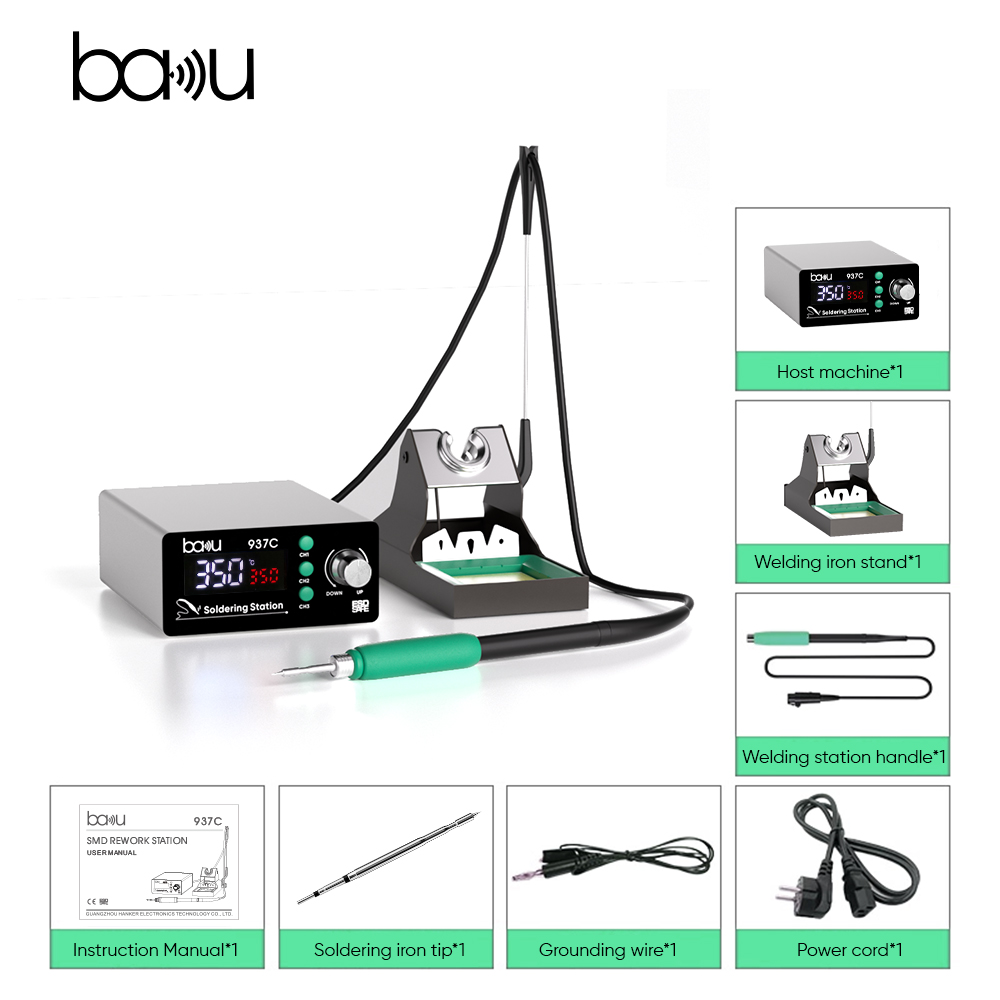
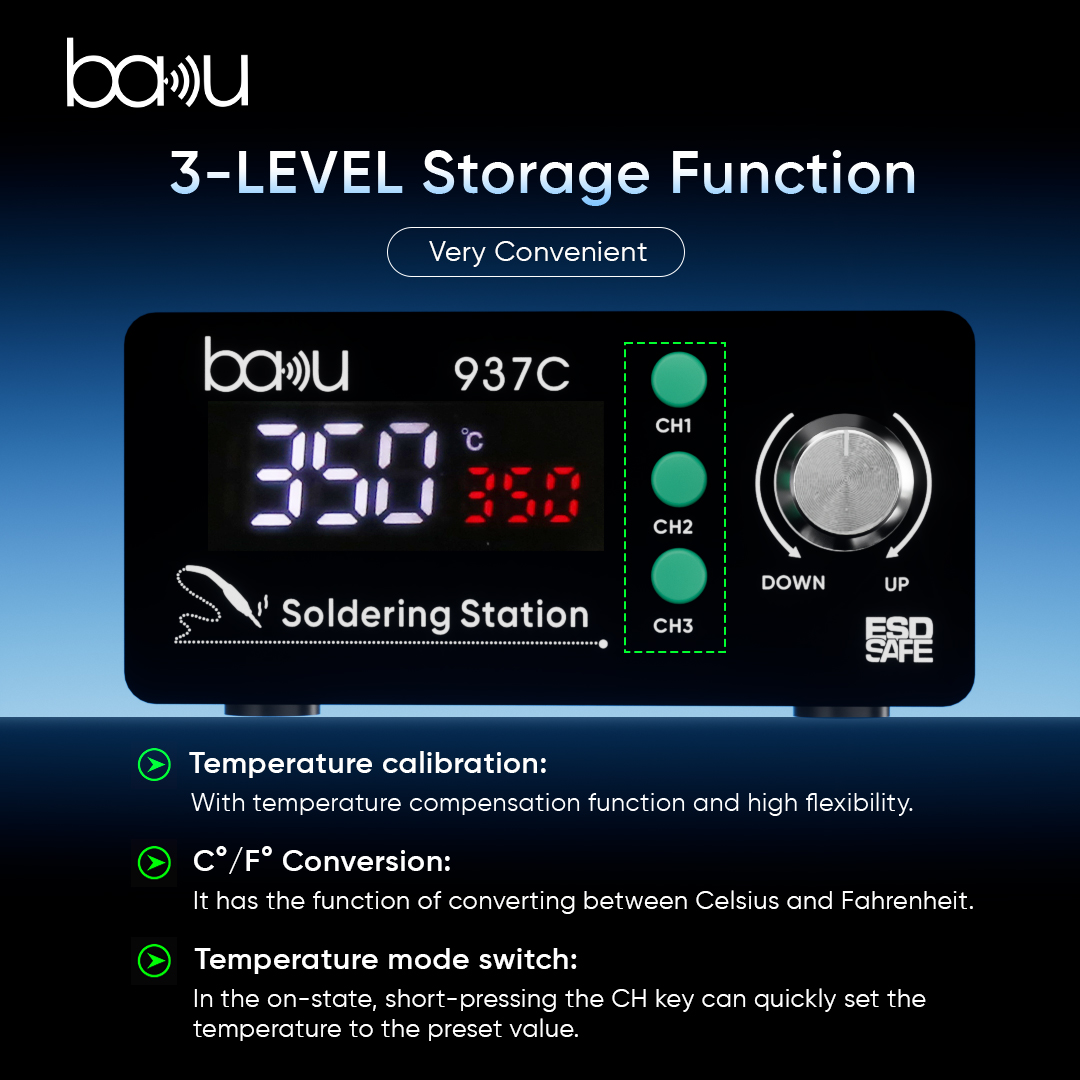
Temperature performance is one of the most important checkpoints for electronic repair equipment. The BAKU BA-937C 2s Rapid Temp Soldering Station features a 120W rating, an LED microcomputer digital display, and an iron temperature range of 200°C–500°C. During testing, compare the selected temperature with the displayed reading and check whether the unit heats steadily instead of cycling abnormally or losing power during continuous work.
3. Inspect External Connections and Noise
A basic physical inspection should include the power cable, control panel, heating element, working connections, ventilation openings, and outer housing. The BA-937C measures 225x194x105mm, has a net weight of 1kg, and lists an operating noise level below 45dB. These specifications can help technicians assess placement, handling, and unusual noise, but they should not replace qualified service when an internal fault is suspected.
4. Match Testing to the Repair Application
Diagnosis should reflect how the equipment is used. Mobile phone and tablet workshops may rely on these tools for motherboard chip repair, screen separation, solder cleaning, and component replacement. Laptop and computer repair environments may additionally require soldering, disassembly, BGA rework, circuit-board fault repair, and anti-static protection for sensitive components.
Documentation, Certification, and Service
When a fault cannot be resolved through external checks, record the product model, operating conditions, selected temperature, observed display status, and exact failure symptoms before requesting assistance. The supplied compliance records include CE certificates 2022SZ0629222 and 2022SZ0629223 for solder stations in the European Union, along with FCC certificates for the United States. These documents should be matched to the specific product and destination-market requirements.
Reported applications include a Philippine electronics repair store using mixed repair-tool kits for regular phone motherboard repair, chip work, and screen separation. A Mexican computer repair workshop reportedly uses soldering and BGA rework equipment for laptop motherboard repairs and circuit-board troubleshooting. These examples underline the importance of temperature stability, repeatable performance, and careful handling in high-frequency workshop environments.
Diagnostic Reference Table
| Check Area | Recommended Action | Relevant Product Reference |
|---|---|---|
| Power and display | Inspect the power connection, startup response, and LED microcomputer display. | LED microcomputer digital display |
| Temperature adjustment | Compare the selected setting with the displayed status and monitor stability while heating. | 200°C–500°C iron temperature range |
| Heating output | Confirm that heat is delivered consistently during soldering and related repair tasks. | 120W power rating |
| Noise and placement | Listen for abnormal sounds and ensure the equipment is positioned securely on a stable surface. | Noise below 45dB; net weight 1kg |
| Technical support | Collect the fault description, product information, and usage conditions before contacting service personnel. | 1-year after-sales support with online support after warranty |
Frequently Asked Questions
What should I do if the equipment will not turn on?
Start by checking the power source, cable condition, control interface, and display response. If there is still no activity, stop using the unit, document the symptom, and contact technical support instead of continuing to operate it.
How can inconsistent heating be identified?
Set a known temperature, compare the target value with the displayed status, and observe the heating response during continuous work. The BA-937C reference range is 200°C–500°C, supported by a 120W power rating.
Which repair tasks should a troubleshooting guide cover?
The guide should consider mobile phone and tablet motherboard repair, LCD screen separation, solder cleaning, component replacement, laptop motherboard service, BGA chip rework, and circuit-board fault diagnosis where relevant.
Conclusion and Purchasing Considerations
An effective LCD Separator troubleshooting guide should provide symptom-based instructions for power, display, heating, temperature regulation, noise, connections, and safe operation. It should also define when the operator must stop testing and request professional support. BAKU supplies its own brand for wholesale orders and offers OEM and ODM customization. The stated BA-937C MOQ is 50pcs, with an estimated delivery period of 7–15 days and export coverage across global markets. For technical assistance or product inquiries, contact hanker002@bakutool.com.
About BAKU
Guangdong BAKU Technology Development Co., Ltd. was established in 2003 and develops professional electronic repair tools, including soldering stations, solder flux, solder paste, screwdrivers, and ultrasonic cleaners. Its independent R&D laboratory supports industrial design, structural engineering, PCB debugging, and reliability testing. The company reports 25 design patents and maintains testing capabilities for aging, temperature control, and ESD performance. BAKU products are supplied to South America, Europe, Southeast Asia, and other markets, with the supplied certification records including CE and FCC approvals for solder stations.

REPORT